Showing posts with label Violet. Show all posts

Monday, December 6, 2010

Kokona Blogger Template

Kokona Blogger Template


Template name : Kokona

Template type : 1 Sidebar, 2 Column, Adapted from Wordpress, Featured Section, Fixed width, Header Banner, Magazine, Right Sidebar, Rounded corners, Slider, Top Navigation Bar, Violet, Web 2.0, White

Release date : December 6, 2010

Coder/Designer Name(s) : Lasantha Bandara / New WP Themes

Coder/Designer URL(s) : http://www.premiumbloggertemplates.com/
http://newwpthemes.com/

Basic Instructions : How to install a Blogger template

Advanced Details : http://www.premiumbloggertemplates.com/2010/12/kokona-blogger-template.html


Configure Meta tags

Login to your blogger dashboard--> layout- -> Edit HTML.Now Scroll down to where you see below codes :

<meta content='DESCRIPTION HERE' name='description'/>
<meta content='KEYWORDS HERE' name='keywords'/>

Replace DESCRIPTION HERE,KEYWORDS HERE as below.

DESCRIPTION HERE:Write your blog description
KEYWORDS HERE:Write the keywords of your blog separated by comma.

How To Configure Favicon:

Login to your blogger dashboard--> layout- -> Edit HTML.Now Scroll down to where you see below code :

<link href='YOUR-FAVICON-URL' rel='shortcut icon' type='image/vnd.microsoft.icon'/>

Now replace "YOUR-FAVICON-URL" with your Favicon address/url.


Configure Featured Content Slider:

Login to your blogger dashboard--> layout- -> Edit HTML.Find <!-- Featured Content Slider Started -->.Now scroll down slowly and you can see each featured slider codes between <div class='imageElement'> and </div> .

Now replace,

"This is featured post X title" with your featured post title.
"SLIDER-X-URL-HERE" with your featured post title.
Slider description with your slider description.
Slider image with your slider image.

for each featured slider.

How To Add a Header Logo

You can add a header logo for this template easily in the "Page Elements" section(Blogger Default Method).Logo image size must be 356px width and 55px height.

If you have any problem regrading this template,leave a comment below.

Important !!!:

Please do not remove the footer credit. I spend several hours to create this blogger template. So that you can use it for your blog. All I ask is, stay the credit intact.

License:

This free Blogger template is licensed under the Creative Commons Attribution 3.0 License,which permits both personal and commercial use.
However, to satisfy the 'attribution' clause of the license, you are required to keep the footer links intact which provides due credit to its authors. For more specific details about the license, you may visit the URL below:
http://creativecommons.org/licenses/by/3.0/

Monday, November 22, 2010

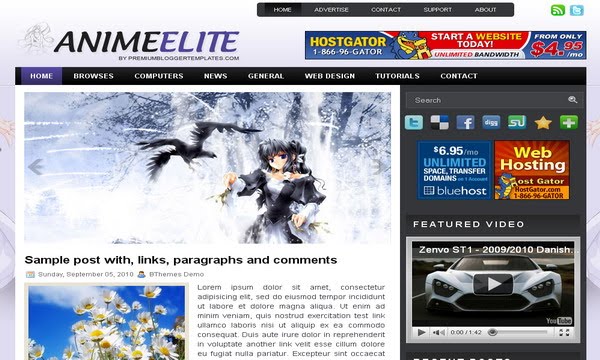
AnimeElite Blogger Template

AnimeElite Blogger Template


Template name : AnimeElite

Template type : 1 Sidebar, 2 Column, Adapted from Wordpress, Artworks, Featured Section, Fixed width, Header Banner, Magazine, Right Sidebar, Rounded corners, Slider, Top Navigation Bar, Violet, White

Release date : November 23, 2010

Coder/Designer Name(s) : Lasantha Bandara / New WP Themes

Coder/Designer URL(s) : http://www.premiumbloggertemplates.com/
http://newwpthemes.com/

Basic Instructions : How to install a Blogger template

Advanced Details : http://www.premiumbloggertemplates.com/2010/11/animeelite-blogger-template.html


Configure Meta tags

Login to your blogger dashboard--> layout- -> Edit HTML.Now Scroll down to where you see below codes :

<meta content='DESCRIPTION HERE' name='description'/>
<meta content='KEYWORDS HERE' name='keywords'/>

Replace DESCRIPTION HERE,KEYWORDS HERE as below.

DESCRIPTION HERE:Write your blog description
KEYWORDS HERE:Write the keywords of your blog separated by comma.

How To Configure Favicon:

Login to your blogger dashboard--> layout- -> Edit HTML.Now Scroll down to where you see below code :

<link href='YOUR-FAVICON-URL' rel='shortcut icon' type='image/vnd.microsoft.icon'/>

Now replace "YOUR-FAVICON-URL" with your Favicon address/url.


Configure Featured Content Slider:

Login to your blogger dashboard--> layout- -> Edit HTML.Find <!-- Featured Content Slider Started -->.Now scroll down slowly and you can see each featured slider codes between <div class='imageElement'> and </div> .

Now replace,

"This is featured post X title" with your featured post title.
"SLIDER-X-URL-HERE" with your featured post title.
Slider description with your slider description.
Slider image with your slider image.

for each featured slider.

How To Add a Header Logo

You can add a header logo for this template easily in the "Page Elements" section(Blogger Default Method).Logo image size must be 373px width and 83px height.

If you have any problem regrading this template,leave a comment below.

Important !!!:

Please do not remove the footer credit. I spend several hours to create this blogger template. So that you can use it for your blog. All I ask is, stay the credit intact.

License:

This free Blogger template is licensed under the Creative Commons Attribution 3.0 License,which permits both personal and commercial use.
However, to satisfy the 'attribution' clause of the license, you are required to keep the footer links intact which provides due credit to its authors. For more specific details about the license, you may visit the URL below:
http://creativecommons.org/licenses/by/3.0/

Monday, September 6, 2010

Renegate Blogger Template


Template name : Renegate

Template type : 2 Sidebar, 3 Column, Adapted from Wordpress, Featured Section, Fixed width, Header Banner, Left Sidebar, Magazine, Right Sidebar, Rounded corners, Slider, Top Navigation Bar, Violet

Release date : September 7, 2010

Coder/Designer Name(s) : Lasantha Bandara / New WP Themes

Coder/Designer URL(s) : http://www.premiumbloggertemplates.com/
http://newwpthemes.com/

Basic Instructions : How to install a Blogger template

Advanced Details : http://www.premiumbloggertemplates.com/2010/09/renegate-blogger-template.html


Configure Meta tags

Login to your blogger dashboard--> layout- -> Edit HTML.Now Scroll down to where you see below codes :

<meta content='DESCRIPTION HERE' name='description'/>
<meta content='KEYWORDS HERE' name='keywords'/>

Replace DESCRIPTION HERE,KEYWORDS HERE as below.

DESCRIPTION HERE:Write your blog description
KEYWORDS HERE:Write the keywords of your blog separated by comma.

How To Configure Favicon:

Login to your blogger dashboard--> layout- -> Edit HTML.Now Scroll down to where you see below code :

<link href='YOUR-FAVICON-URL' rel='shortcut icon' type='image/vnd.microsoft.icon'/>

Now replace "YOUR-FAVICON-URL" with your Favicon address/url.


Configure Featured Content Slider:

Login to your blogger dashboard--> layout- -> Edit HTML.Find <!-- Featured Content Slider Started -->.Now scroll down slowly and you can see each featured slider codes between <div class='imageElement'> and </div> .

Now replace,

"This is featured post X title" with your featured post title.
"SLIDER-X-URL-HERE" with your featured post title.
Slider description with your slider description.
Slider image with your slider image.

for each featured slider.

If you have any problem regrading this template,leave a comment below.

Important !!!:

Please do not remove the footer credit. I spend several hours to create this blogger template. So that you can use it for your blog. All I ask is, stay the credit intact.

License:

This free Blogger template is licensed under the Creative Commons Attribution 3.0 License,which permits both personal and commercial use.
However, to satisfy the 'attribution' clause of the license, you are required to keep the footer links intact which provides due credit to its authors. For more specific details about the license, you may visit the URL below:
http://creativecommons.org/licenses/by/3.0/

Friday, September 3, 2010

Malina Blogger Template


Template name : Malina

Template type : 2 Sidebar, 3 Column, Adapted from Wordpress, Featured Section, Fixed width, Header Banner, Left Sidebar, Magazine, Red, Right Sidebar, Rounded corners, Slider, Top Navigation Bar, Violet, White

Release date : September 4, 2010

Coder/Designer Name(s) : Lasantha Bandara / New WP Themes

Coder/Designer URL(s) : http://www.premiumbloggertemplates.com/
http://newwpthemes.com/

Basic Instructions : How to install a Blogger template

Advanced Details : http://www.premiumbloggertemplates.com/2010/09/malina-blogger-template.html


Configure Meta tags

Login to your blogger dashboard--> layout- -> Edit HTML.Now Scroll down to where you see below codes :

<meta content='DESCRIPTION HERE' name='description'/>
<meta content='KEYWORDS HERE' name='keywords'/>

Replace DESCRIPTION HERE,KEYWORDS HERE as below.

DESCRIPTION HERE:Write your blog description
KEYWORDS HERE:Write the keywords of your blog separated by comma.

How To Configure Favicon:

Login to your blogger dashboard--> layout- -> Edit HTML.Now Scroll down to where you see below code :

<link href='YOUR-FAVICON-URL' rel='shortcut icon' type='image/vnd.microsoft.icon'/>

Now replace "YOUR-FAVICON-URL" with your Favicon address/url.


Configure Featured Content Slider:

Login to your blogger dashboard--> layout- -> Edit HTML.Find <!-- Featured Content Slider Started -->.Now scroll down slowly and you can see each featured slider codes between <div class='imageElement'> and </div> .

Now replace,

"This is featured post X title" with your featured post title.
"SLIDER-X-URL-HERE" with your featured post title.
Slider description with your slider description.
Slider image with your slider image.

for each featured slider.

If you have any problem regrading this template,leave a comment below.

Important !!!:

Please do not remove the footer credit. I spend several hours to create this blogger template. So that you can use it for your blog. All I ask is, stay the credit intact.

License:

This free Blogger template is licensed under the Creative Commons Attribution 3.0 License,which permits both personal and commercial use.
However, to satisfy the 'attribution' clause of the license, you are required to keep the footer links intact which provides due credit to its authors. For more specific details about the license, you may visit the URL below:
http://creativecommons.org/licenses/by/3.0/

Tuesday, May 18, 2010

Grunge Floral Blogger Template


Template name : Grunge Floral

Template type : 1 Sidebar, 2 Column, Adapted from Wordpress, Fixed width, Pink, Right Sidebar, Rounded corners, Top Navigation Bar, Violet, White, Nature

Release date : 01-01-2010

Coder/Designer Name(s) : Templates Block / Russia Tours

Coder/Designer URL(s) : http://www.templatesblock.com/

Basic Instructions : How to install a Blogger template

Advanced Details : No data

Monday, May 17, 2010

Emo Blogger Template


Template name : Emo

Template type : 1 Sidebar, 2 Column, Fixed width, Left Sidebar, Adapted from Wordpress, Black, Rounded corners, Violet

Release date : 12-01-2009

Coder/Designer Name(s) : Klodian

Coder/Designer URL(s) : http://www.deluxetemplates.net/

Basic Instructions : How to install a Blogger template

Advanced Details : No data

Thursday, April 29, 2010

FemaleZine Blogger Template


Template name : FemaleZine

Template type : 2 Sidebar, 3 Column, 3 Column footer, Fixed width, Header Banner, Left Sidebar, Magazine, Right Sidebar, Top Navigation Bar, Violet, White

Release date : No data

Coder/Designer Name(s) : Bie Templates

Coder/Designer URL(s) : http://www.bietemplates.com/

Basic Instructions : How to install a Blogger template

Advanced Details : http://www.bietemplates.com/2009/11/femalezine.html

Monday, April 5, 2010

Twilight or Eclipse Blogger Template


Template name : Twilight or Eclipse

Template type : 2 Sidebar, 3 Column, Artworks, Fluid width, Minimalist, Right Sidebar, Violet, White

Release date : No data

Coder/Designer Name(s) : Quiterandom

Coder/Designer URL(s) : http://quiterandom.com/

Basic Instructions : How to install a Blogger template

Advanced Details : http://quiterandom.com/freebies/twilight/

Quietude Blogger Template


Template name : Quietude

Template type : 1 Sidebar, 2 Column, Fluid width, Fresh, Minimalist, Right Sidebar, Violet, White, Top Navigation Bar, Vector

Release date : 07-01-09

Coder/Designer Name(s) : Blog and Web / Arcsin

Coder/Designer URL(s) : http://blogandweb.com/
http://templates.arcsin.se/

Basic Instructions : How to install a Blogger template

Advanced Details : No data

Sunday, March 21, 2010

Mystique Blogger Template


Template name : Mystique

Template type : 1 Sidebar, 2 Column, Adapted from Wordpress, Black, Elegant, Fixed width, Grey, Premium, Right Sidebar, Top Navigation Bar, Violet, White

Release date : No data

Coder/Designer Name(s) : ThemeCraft / Digital Nature

Coder/Designer URL(s) : http://themecraft.net/
http://digitalnature.ro/

Basic Instructions : How to install a Blogger template

Advanced Details : No data

Sunday, March 7, 2010

Music Globe Blogger Template


Template name : Music Globe

Template type : 1 Sidebar, 2 Column, Adapted from Wordpress, Fixed width, Right Sidebar, Top Navigation Bar, Violet, White

Release date : 10-01-09

Coder/Designer Name(s) : Klodian / New WP Themes

Coder/Designer URL(s) : http://www.deluxetemplates.net/
http://newwpthemes.com/

Basic Instructions : How to install a Blogger template

Advanced Details : No data

Thursday, September 24, 2009

Tired Girl Blogger Template


Template name : Tired Girl

Template type : 2 Sidebar, 3 Column, Fixed width, Grey, Left Sidebar, Right Sidebar, Rounded corners, Violet

Release date : 03-07-09

Coder/Designer Name(s) : Diana

Coder/Designer URL(s) : http://skincorner.com

Basic Instructions : How to install a Blogger template

Advanced Details : No data

Girly Magazine Blogger Template


Template name : Girly Magazine

Template type : 2 Sidebar, 3 Column, Fixed width, Fresh, Magazine, Pink, Premium, Right Sidebar, Top Navigation Bar, Violet, White

Release date : No data

Coder/Designer Name(s) : Bie

Coder/Designer URL(s) : http://www.bietemplates.com
http://www.ipietoon.com

Basic Instructions : How to install a Blogger template

Advanced Details : http://www.bietemplates.com/2009/07/girly-magazine.html

Cosmetic Girl Blogger Template


Template name : Cosmetic Girl

Template type : 2 Sidebar, 3 Column, Fixed width, Pink, Right Sidebar, Rounded corners, Top Navigation Bar, Violet, White

Release date : No data

Coder/Designer Name(s) : Cebong Ipiet

Coder/Designer URL(s) : http://www.ipietoon.com

Basic Instructions : How to install a Blogger template

Advanced Details : http://www.ipietoon.com/2009/08/blogger-template-cosmetic-girl.html

Neo Blogger Template


Template name : Neo

Template type : 2 Sidebar, 3 Column, Fixed width, Right Sidebar, Top Navigation Bar, Violet, White

Release date : 12-19-06

Coder/Designer Name(s) : Ramani

Coder/Designer URL(s) : http://hackosphere.blogspot.com/

Basic Instructions : How to install a Blogger template

Advanced Details : No data